
Table of Contents
What are approvers? #
- An approver in XTendLink is any user with approver rights.
- Approvers can approve payments and import from the bank.
- Approver rights are granular and allow for precise separation of responsibilities.
- Approver rights are defined for each bank .
- each bank may have a different set of approvers
- By default, two approvers are required to finalise any payment for increased security
Approver Role vs Rights #
- Approver role and approver rights are different, and connected, concepts.
- Approver role gives access to the approval page in XTendLink.
- Approver rights give permission to approve payments, using XTendLink or through a connection (e.g. ERP)
A user with only approver rights:
– CAN approve payments through a connection
– Can NOT access the approval page in XTL
A user with only approval role:
– CAN access the approval page in XTL
– Can NOT approve payments
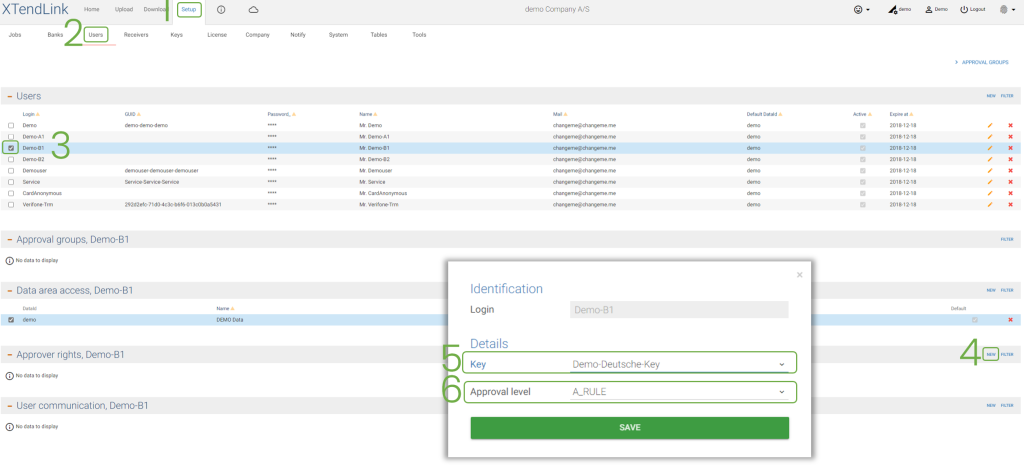
How to give approver rights #
- Click on Setup
- Click on Users
- Select the user
- Click on new in Approver rights
- Set the key
- Choose the approval level
Security and approvers #
- To realise a payment, a connection to the bank must be created
- Connections in XTendLink use a “lock” that requires several “keys” to open
- These keys are linked to the user password
- If the user resets their password because they forgot it, they will lose access to the key and a new key must be made
- If the user changes their password using their old one, they will NOT lose access to the key
- There are two types of approval rights in XTL: A-Rule and B-Rule
Users in A-Rule:
– Have all required “keys”
– Can approve by themselves
Users in B-Rule:
– Only have half of the required “keys”
– An extra approval step is required, from either another user in B-Rule or from a user in A-Rule
Approver Admins #
- When creating a new connection to a bank, approver admins will also be created/defined automatically
- Approver admins can give, remove or edit approver rights for the same bank
- Approver admins may be in either A-Rule or B-Rule
- An approver admin in A-Rule can edit approver rights by themselves
- An approver admin in B-Rule needs another approver admin to edit approver rights
- Any approver admin is, by definition, also a user with approver rights – an approver
Approval groups #
- Approval groups are used to give increased security and scrutiny in approving payments
- Users do not have to belong in any approval group
- Users may belong to more than one approval group
- Approval groups modify the requirements for approval
- An extra step may be necessary
- An approval from a user belonging to a specific approval group may be necessary
| Group name | Extra feature | Benefits | Example |
|---|---|---|---|
| Approver Separation | Requires users from different groups to approve a payment | Members of a single team can’t approve by themselves | Two groups exist, Team A and Team B. To approve a payment, one user from Team A and one user from Team B are required. |
| Main Approvers | A user from this group is always required to approve | Forces any approval to pass through the hierarchy, e.g., a manager | A normal approver starts the approval process and then a user from the Main Approvers group finishes the last approval step |
| Amount Trans | Any individual transaction above this limit triggers an extra approval step from this group | Any large enough transaction will trigger an approval from someone else, e.g., a manager | A payment with a transaction over the limit is approved by two normal approvers in B-Rule. Another approval is required from a user in the Amount Trans group |
| Amount Sum | Any payment above this limit triggers an extra approval step from this group | Any large enough payment will trigger an approval from someone else, e.g., a manager | A payment with a total amount over the limit is approved by two normal approvers in B-Rule. Another approval is required from a user in the Amount Sum group |
| Receiver Account | The receiver accounts (BBAN/IBAN) must also be approved | Guarantees that a payment is not made to a wrong account due to an error or malicious intent | A payment to a new receiver account is approved by two normal approvers. It is blocked until this new receiver account is manually approved. |
| Approver Account | Users in this group can only approve payments of accounts allowed | Separates the accounts of different teams even if they are from the same bank | A user from team A tries to approve a payment using a bank account from team B and is blocked automatically |
| Notify | Users in this group are notified of payments and other approvals | Allows for more transparency | A payment is approved, and the user in this group receives a notification that it happened |